
19/10/2026 06:43
Instagram Hidden Words for Cambodian Florists: Filter Spam Without Losing Customer Questions

A flower shop’s Instagram comments can contain delivery questions, bouquet requests, complaints and unrelated promotions in the same thread. Filtering everything uncomfortable can hide the information customers need. Leaving repeated spam untouched can make useful conversations harder to follow. For Cambodian businesses considering SMM panel services, the practical first question is whether staff can recognise and answer genuine enquiries already arriving. This guide explains how a florist can build a narrow Instagram Hidden Words list, review its effects and preserve legitimate criticism. The shop and customer situations below are hypothetical illustrations, not customer testimonials or reported results.
1. Define what the filter should protect
Imagine a hypothetical Phnom Penh florist posting a bouquet-making video before a busy weekend. People ask whether particular flowers are available, whether delivery reaches their neighbourhood and how to arrange collection. Unrelated accounts also post repeated promotional messages. The shop’s objective is to keep relevant questions easy to find while reducing clearly unwanted material.
Write a short moderation rule before opening any settings: answer product questions, investigate service complaints, review uncertain language and filter repeated unrelated spam. Apply it to favourable and unfavourable comments equally. A customer saying a bouquet arrived late may be describing a real problem. Removing that complaint simply because it looks negative would conceal useful feedback and leave the underlying delivery issue unresolved.
2. Understand the tool before building a list
Meta describes Hidden Words as a way to filter potentially harmful comments and message requests. It also allows a custom list of additional words, phrases and emojis. These capabilities can support a shop’s moderation routine, but they do not establish whether a person is a customer or whether a complaint is accurate. Source: https://about.fb.com/news/2022/10/protecting-people-on-instagram-from-abuse/.
In the Instagram account you manage, locate Hidden Words in the current settings and read the explanations beside the available controls. Note which controls concern comments and which concern message requests. Review what is enabled before changing anything. Menu placement can change, so follow the labels shown in your app. Treat initial setup as the beginning of a review process, rather than proof that all unwanted content will now disappear.
3. Sort comments into three practical routes
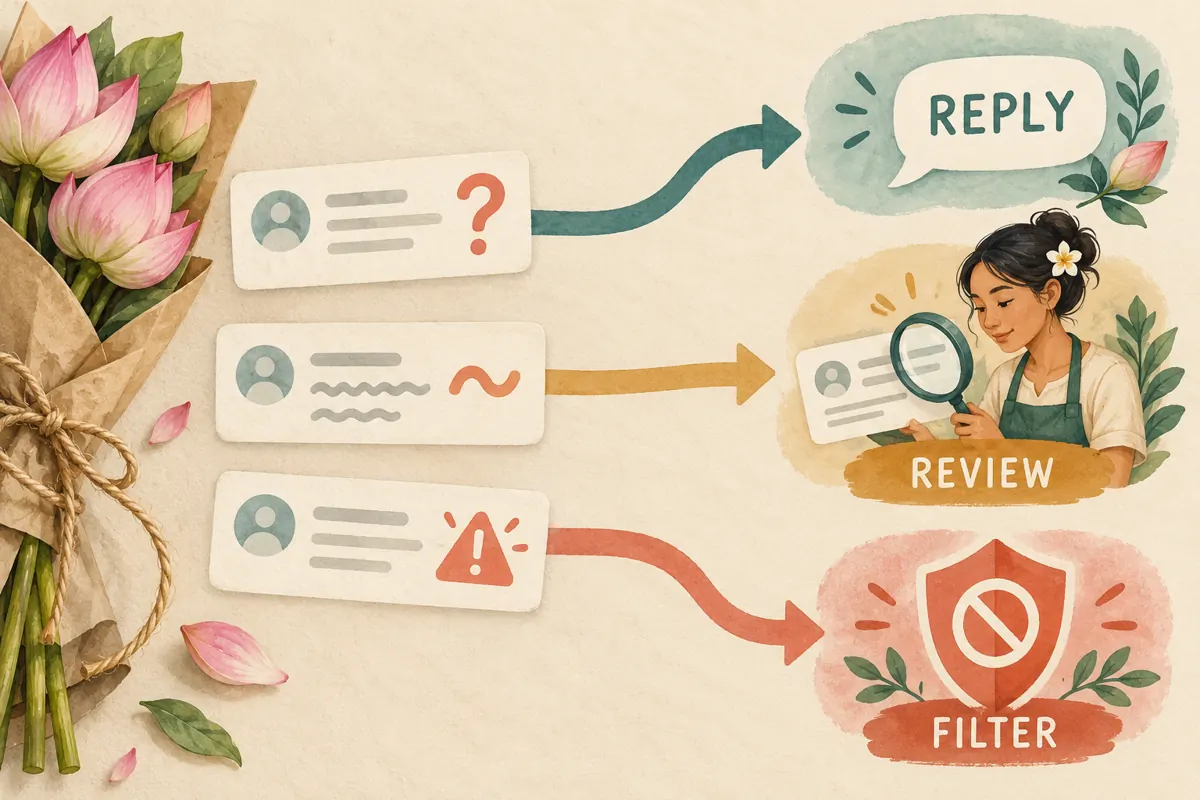
Use three working categories: reply, review and filter. Reply covers understandable questions about bouquets, availability, collection and delivery. Review covers ambiguous wording, possible complaints, unfamiliar expressions and comments containing personal information. Filter covers a specific unwanted pattern you can explain, such as the same unrelated solicitation repeatedly appearing beneath different flower posts.
For a hypothetical example, “Can you deliver near my workplace?” belongs in reply. “You never answered me” belongs in review until someone checks the conversation. A repeated offer to sell unrelated account-growth services may justify a narrow spam rule. These are internal decisions, not official Instagram categories. When staff disagree, keep the item for human assessment. A filter should not become a shortcut for avoiding awkward conversations.
4. Build a small list from observed spam
Start with unwanted wording that has actually appeared on the shop’s posts. Copy only the phrase needed to recognise the pattern, leaving out usernames and unnecessary personal details. Beside each proposed entry, record why it belongs on the list and one example of a legitimate sentence it might accidentally catch. This forces the team to consider the cost of filtering before activating a rule.
Avoid broad entries such as “delivery,” “price,” “refund” or “message me.” Each can occur in an ordinary customer conversation. In a hypothetical case, filtering “delivery” to suppress repeated advertisements could also catch a buyer asking about delivery to a hospital. Prefer a distinctive recurring solicitation over a common shopping word. If no suitably narrow phrase exists, handle the comments individually instead of expanding the list.
5. Review Khmer and mixed-language comments carefully
A Cambodian shop may receive Khmer script, English, transliterated Khmer and mixtures of these within one conversation. Do not assume the same expression will always have the same spelling or meaning. Ask someone who understands the customer’s language to assess unclear wording. A short unfamiliar phrase, an emoji or an unusual spelling is not sufficient evidence that a comment is spam.
For each proposed rule, compare the exact observed wording with plausible shopping questions. Consider spaces, punctuation and mixed scripts during review, but do not assume how Instagram matches every variation. The official material cited here does not establish dependable Khmer-language detection. Keep human review available and avoid downloading a large generic blocked-word list whose meanings your team cannot confidently explain.
6. Test for customer questions that could be caught
Before activating a custom entry, test its logic on paper against a small set of hypothetical comments. Include an availability question, a dissatisfied customer, a delivery enquiry and the unwanted phrase. This exercise tests your judgment, not Instagram’s matching behaviour. If the entry seems likely to suppress an ordinary question, narrow it or leave it out.
Then make a limited settings change and observe actual comments using the review options available in your app. Record the phrase, the date, the intended purpose and any legitimate conversation affected. Do not change several unrelated controls simultaneously; that makes unexpected effects harder to investigate. If the filter catches useful enquiries, remove or revise the problematic entry and review affected conversations through the controls Instagram provides.
7. Keep complaints and private details on different paths
A complaint deserves assessment even when its tone is frustrated. In a hypothetical exchange, a customer says the delivered bouquet differed from the photograph. A useful public response acknowledges the concern and explains that staff will check the order. Invite the customer to send the necessary reference privately. Do not ask them to post their telephone number, home address or payment evidence beneath the video.
Private information creates a separate moderation decision from criticism. A comment can contain a valid complaint and still expose details that should not remain public. Address the exposure using the available controls while continuing the service conversation privately. Keep only the information needed for follow-up. Staff should not circulate screenshots containing a customer’s address merely to explain why a word-list entry was changed.

8. Decide where SMM services fit—and where they do not
A panel listing is not a moderation solution. The supplied smm-asian.com catalogue includes the exact public name “Instagram Likes ~ Türkiye 🇹🇷 ~ Max 1k ~ Instant ~ 𝐍𝐎 𝗥𝗘𝗙𝗜𝗟𝗟”. Its description is empty. The title identifies a likes-related listing, but there is no supporting description here that verifies delivery terms, audience origin or suitability for a Cambodian florist. Treat the wording as a catalogue label rather than independently established performance evidence.
Buying engagement cannot answer a delivery question, investigate a complaint or maintain a filter list. Purchased engagement is not evidence of genuine interest, sales, advertising delivery or Cambodian users. Meta has also documented action against services providing fake Instagram likes, views and followers. Source: https://about.fb.com/news/2019/04/preventing-inauthentic-behavior-on-instagram/amp/.
If the business problem is unread enquiries or spam, assign moderation time before considering an engagement purchase. Do not buy activity to bury criticism or make a conversation appear more popular. For readers comparing panel services, choosing no order is a sensible outcome when the offered activity does not solve the actual task.
9. Give the review routine an owner
Choose who checks comments during opening hours and who handles uncertain cases. A small florist might have the counter assistant answer availability questions while the owner reviews complaints and proposed filter changes. Agree on review periods the team can actually maintain. Avoid promising immediate replies when the same person is also wrapping bouquets and coordinating collections.
At each review, examine unanswered questions and any filtered material accessible through the account’s controls. Staff should not be required to repeatedly read abusive content; escalate difficult cases appropriately. Keep a minimal decision note when a rule changes: what pattern prompted it, who reviewed it and whether an ordinary enquiry was affected. The purpose is to make the next decision easier, without building an unnecessary archive of people’s comments.
10. Judge success by useful conversations
A quieter comment section does not automatically mean moderation improved. It may mean unwanted material decreased, or it may mean the filter became too broad. Look for concrete evidence: whether delivery questions received answers, whether complaints reached the responsible person and whether any useful comments were mistakenly caught. These observations help improve the workflow without claiming that filtering caused sales.
Common mistakes include copying another business’s list, blocking negative words, treating unfamiliar languages as suspicious and expanding filters without checking their effects. Another mistake is celebrating a larger engagement total while real questions remain unanswered. At the end of a review period, retain rules with a clear purpose, revise those causing problems and remove entries nobody can explain. Keep the conversation useful enough that a prospective buyer can ask an honest question.

Frequently asked questions
Should a florist block words such as “expensive” or “refund”?
Usually those words need context. A shopper may be comparing options, asking about policy or describing a problem that staff should resolve. A broad filter could hide these conversations. Read the comment, answer the relevant question and assess abusive behaviour separately from an unfavourable opinion about the business.
Can Hidden Words reliably recognise every unwanted Khmer comment?
Do not assume that it can. The official sources used here do not establish complete Khmer coverage or accuracy for mixed scripts and transliteration. Start with observed wording, ask a fluent reviewer about ambiguity and inspect results. Neither a visible comment nor a filtered comment should be treated as automatically classified correctly.
What should we do when a customer says their question disappeared?
Ask what they were trying to find out and answer that question first. Then inspect the relevant post and the moderation controls available to your account. Review recent filter changes for an overly broad entry. Explain only what you can verify; do not blame the customer or claim certainty about Instagram’s automated decision.
Will buying likes help legitimate comments become easier to manage?
A likes order does not perform moderation or answer customers. It also does not demonstrate that local buyers have seen or understood the post. If staff are overwhelmed, simplify the reply process, clarify recurring delivery information and assign review time. Do not treat purchased engagement as a way to offset complaints or establish credibility.
How often should a small shop revise its custom list?
Review it when a new unwanted pattern appears, when someone reports a missed enquiry or during an agreed routine check. There is no need to add terms simply to make the list longer. Keep an entry only while its purpose remains clear and its effects are acceptable. Remove or narrow rules that interfere with ordinary customer conversations.
Explore the current service catalogue, create an account, or ask a specific question through support tickets.
- Meta: Updates to How We Protect People on Instagram From Abuse
- Meta: Preventing Inauthentic Behavior on Instagram
Prepared with AI assistance. Illustrations explain the workflow and do not represent customer results.